
Is your child locked out of their toy safe because the code was forgotten or accidentally changed? This situation happens far more often than you might think, and the frustration is real for both parents and kids. The good news is that resetting a toy safe code is a straightforward process that doesn’t require any technical expertise or special tools. Most electronic toy safes come with a default code of 0000 and include two reset methods: one for when you know the current code and a battery-powered hard reset for forgotten codes. In this guide, you’ll find step-by-step instructions to regain access to your toy safe, set a new code, and avoid common mistakes that can cause lockouts.
Reset Toy Safe Code When You Know the Current Password
Use this method when you can open the safe and want to change the passcode to something new. The safe must be in the open position for the programming mode to activate.
Enter Programming Mode
With the safe door fully open, press and hold the * (star) button on the keypad. Keep holding it down for about 3 to 5 seconds until you see the red indicator light start blinking. This blinking light confirms the safe has entered programming mode and is ready to accept a new code.
Set Your New Four-Digit Code
Once the red light is blinking, release the * button and enter your desired four-digit passcode. Choose something memorable for your child but not too obvious like 1111 or 1234. After entering the new code, press the # (pound) key to confirm. You should hear a single beep, and the red light will turn off, indicating the new code has been saved successfully.
Test the New Code Immediately
After setting the new code, close the door and test it right away. Enter your new code and press # or simply wait for the unlock beep. The door should open immediately. If it doesn’t, repeat the entire process from the beginning, making sure the door stays open during programming and the batteries are fresh.
Emergency Reset: Forgotten Code Recovery
When the passcode is lost and you cannot access the safe, you need to perform a hard reset by removing the power source. This method restores the factory default code of 0000.
Remove All Batteries
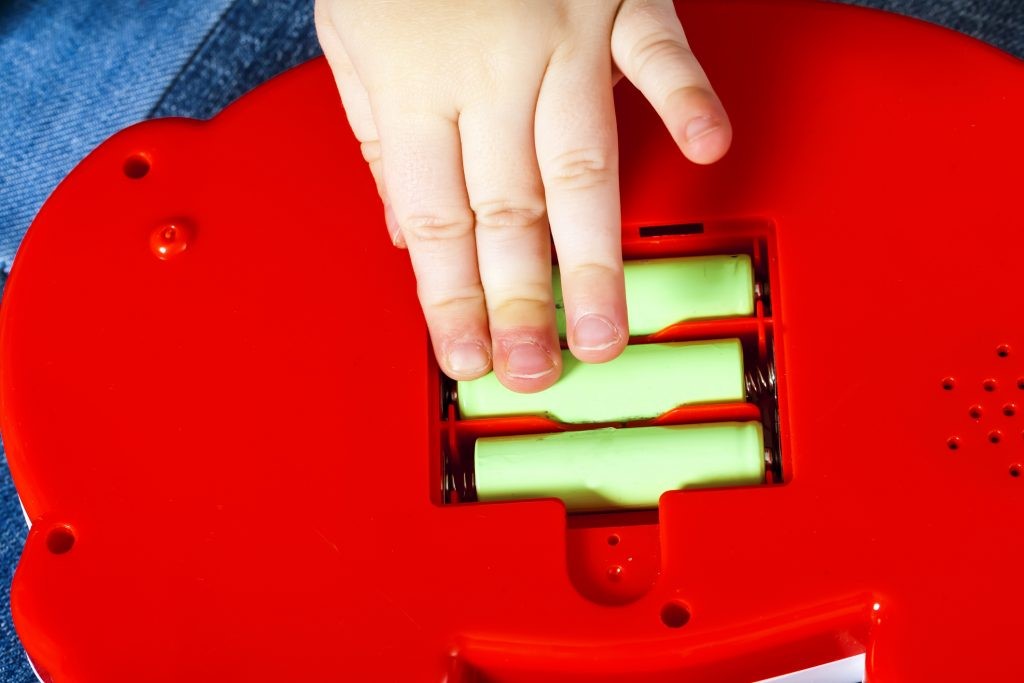
Turn the safe over and locate the rear battery compartment. Use a screwdriver to unscrew the panel, then carefully remove all three AA batteries. Set the batteries aside and wait 5 to 10 seconds. This brief power disconnection clears the saved code from the safe’s memory.
Reinsert Batteries and Check Power
After waiting, reinsert the batteries into the compartment, ensuring they are aligned with the correct polarity. Replace the battery cover and tighten the screws securely. The safe should now reset to its default code of 0000.
Open With Default Code 0000
Stand in front of the safe and enter 0000 on the keypad. Press # or wait for the unlock beep. The door should release immediately. If it doesn’t open, double-check that the batteries are properly installed and consider replacing them with fresh ones.
Set a New Code After Using Emergency Reset
Leaving the safe on the default 0000 code poses a security risk. As soon as you regain access, set a new personalized code using the programming method.
Reprogram Using the Star Button Method
Open the door completely, then press and hold the * button until the red light blinks. Enter your new four-digit code and press # to confirm. Test the new code at least three times to ensure it works reliably before closing the door regularly.
Avoid Common Post-Reset Mistakes
Do not close the door before finishing the programming sequence, as this will cancel the process. Do not skip testing the new code multiple times. Do not leave batteries out for extended periods, as this is unnecessary and may cause other issues.
Troubleshoot Non-Responsive Keypad Issues
If the safe doesn’t beep or blink during reset attempts, the problem may be power-related rather than a code issue.
Check Battery Condition First
Weak or dying batteries often cause symptoms that mimic a lockout, including no beeps, no blinking lights, and unresponsive keypads. Replace all three AA batteries with fresh alkaline ones. Avoid rechargeable batteries, as they often operate at lower voltages and may not power the lock reliably.
Clean Keypad and Contacts
Dust, sticky residue, or spills can interfere with button response. Dampen a cotton swab with rubbing alcohol and gently clean around each key. Allow it to dry completely before testing the keypad again.
Inspect for Internal Damage
If the safe still doesn’t respond after new batteries and cleaning, check for corrosion in the battery tray. White or green crust indicates moisture damage. Clean it with a vinegar-soaked cotton swab and dry thoroughly. If no lights or sounds appear after these steps, the circuit board may be faulty.
Choose a Child-Friendly Code and Build Good Habits
Selecting the right code and teaching responsible use can prevent future lockouts and make the toy safe a positive experience for your child.
Pick a Memorable but Secure Code
Choose a combination your child can easily remember, such as a birthday (0415), house number, or a repeated favorite number (2233). Avoid random digits that are difficult to recall. The goal is independence, not frustration.
Teach Code Responsibility
Explain to your child that the safe is their responsibility. Practice opening it together daily for a week. Turn it into a game to reinforce memory through repetition.
Keep a Backup Plan
Always know how to perform the battery reset method. Store spare AA batteries in a convenient location. Consider keeping a laminated card with reset instructions taped to the back of the safe, out of the child’s reach but easy for you to find.
Model Variations and Compatibility Notes

While most toy safes follow the same reset logic, button layout and indicator colors may vary between brands and models.
Star and Pound Button Alternatives
Some models use a reset button instead of the * button, or they may have a green light instead of red. A few safes have a dedicated reset key under the battery tray. If your safe lacks a * button, look for a small recessed button labeled “reset” and use a paperclip to press it briefly.
Physical Override Keys
Rare older models include a key override on the back for manual unlocking. Insert the key to unlock manually, then reprogram the code through the keypad. This feature is uncommon in modern toy safes.
Frequently Asked Questions About Toy Safe Code Reset
What is the default code for most toy safes?
Most electronic toy safes come factory-set to the default passcode 0000. This code works after a battery-powered hard reset.
How long does the battery reset take?
Removing the batteries for 5 to 10 seconds is sufficient to clear the memory. Reinsert them immediately after this brief wait.
Why won’t my toy safe enter programming mode?
Weak batteries are the most common cause. Replace all three AA batteries with fresh ones before attempting to enter programming mode.
Can I reset the code with the door closed?
No. The safe must be fully open for the internal sensor to detect the open state and allow programming mode to activate.
What should I do if the keypad still doesn’t work after replacing batteries?
Clean the keypad contacts with rubbing alcohol. If there’s visible corrosion in the battery tray, clean it with vinegar and dry thoroughly. If nothing works, the circuit board may be damaged and require replacement.
Key Takeaways for Resetting Your Toy Safe
Resetting a toy safe code is simple once you know the correct method. For known codes, hold the * button until the red light blinks, enter your new four-digit code, and press # to confirm. For forgotten codes, remove all three AA batteries for 5 to 10 seconds to perform a hard reset, then use the default code 0000 to regain access. Always set a new personalized code immediately after any reset and test it multiple times to ensure reliability. Keep spare batteries on hand, teach your child to remember their code, and document the current code in a secure location. By following these steps, you’ll prevent future lockouts and keep the fun going.